Updated: April 30, 2025
If you use Ubuntu, then you enjoy one of its great benefits: long-term support. Five years for each LTS, ten or more if you activate the pro offering (which is free for home users). But if you use one of the community editions, like say Kubuntu, you will be told that you only get three years of updates.
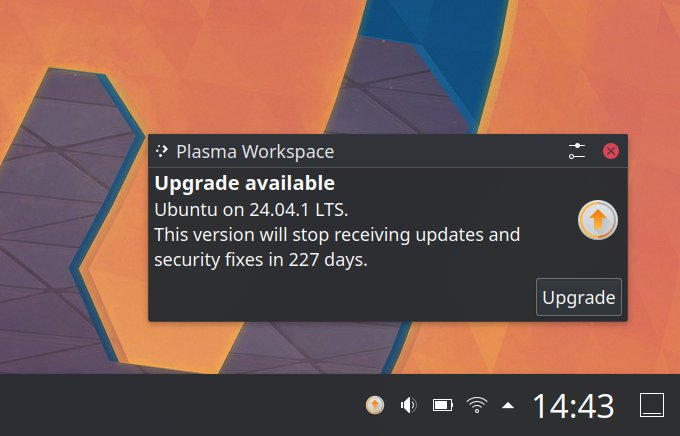
Indeed, for the past year, Kubuntu 22.04 users would see a prompt, on every login, telling them how their version would stop receiving updates and security fixes in this or that many days. I reported about this back in my Slimbook Titan 4 article. The prompt nag couldn't really be easily disabled (from the UI). Worst of all, it simply isn't correct. Your Kubuntu will continue receiving updates, just like an ordinary Ubuntu. Let me show you what gives.
Kubuntu is essentially Ubuntu + Plasma
This is the actual topography, so to speak. But let's see what's under the hood.
- Run an update (with apt), and you will see a list of repositories. In my case, I have:
...
Hit:8 https://esm.ubuntu.com/apps/ubuntu jammy-apps-security InRelease
Hit:9 https://esm.ubuntu.com/apps/ubuntu jammy-apps-updates InRelease
Hit:10 https://esm.ubuntu.com/infra/ubuntu jammy-infra-security InRelease
Hit:11 https://esm.ubuntu.com/infra/ubuntu jammy-infra-updates InRelease
...
- The notable thing here is that all of the packages come from Ubuntu - there's nothing Kubuntu-specific here, and your Kubuntu box, when you run the command, will happily retrieve anything and everything relevant from these archives. In my case, I actually have ESM repos - the Expanded Security Maintenance, which are enabled when you add and activate the Ubuntu pro package on your system. Effectively, this means 10 or even 12 years of updates, should I choose to do so.
- If I look under my sources directory for APT, you can indeed see the ESM repositories, but also additional stuff, including Microsoft Edge, VirtualBox, and WINE. Again, these additional sources do not rely on anything Kubuntu-specific. They are Ubuntu-proper and will work just fine.
-rw-r--r-- 1 root root 193 Mar 4 2023 microsoft-edge.list
-rw-r--r-- 1 root root 266 Mar 4 2023 ubuntu-esm-apps.list
-rw-r--r-- 1 root root 274 Mar 4 2023 ubuntu-esm-infra.list
-rw-r--r-- 1 root root 138 Mar 4 2023 virtualbox.list
-rw-r--r-- 1 root root 163 Jan 22 2023 winehq-jammy.sources
- Technically speaking, you could also add Brave, Vivaldi or Chrome to your box, all of which will add and enable their own repositories, so this guarantees you will keep receiving browser updates. This is the most cardinal part of the picture.
Wait, what about Firefox, you ask? Well I have two versions installed:
- Firefox from the Mozilla tarball, self-extractable and it updates itself when needed. Entirely independent of the the apt infrastructure.
- Firefox as a snap, which updates from the Snap Store, and it, too, can and will continue receiving updates as long as Mozilla keeps making them for the 22.04 version, which, logically, should be at least 10 years if not longer, given the Ubuntu LTS promise and premise.
All right, so then, the question goes from "will Kubuntu keep receiving updates?" to "what part of the system may not receive any fresh patches or fixes?", and this completely changes the picture. Well, in this case, the KDE components may no longer get any fresh improvements past the three-year mark. However, again, this is not entirely true. Perhaps the KDE team will want everyone moving on to newer releases, so they have less legacy maintenance, but anything in the archives is subject to fixes, and has to be, as part of how Ubuntu operates. This includes tons of packages, covered under the ESM umbrella. This also includes various Qt packages, and Plasma components.
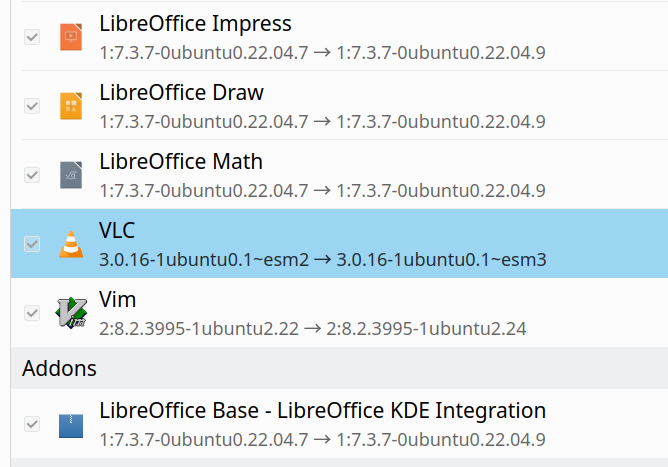
An example of ESM, with VLC, which uses Qt libraries aplenty.
I think this provides clarity, then. Le fin.
Conclusion
The somewhat alarming and misleading notification popup shown to Kubuntu 22.04 users is truly unnecessary. I guess the KDE team wants everyone moving onto the later platforms, so they have less work fixing old, boring stuff, but hey. Kubuntu's boot menu says UBUNTU. The kernel says UBUNTU. The packages all come from Ubuntu archives, and/or depend on an infrastructure designed for long-term support of the main release. Kubuntu 22.04 will continue working just fine, and will receive important security updates well after April 2025. If you want to upgrade, great, but fear shouldn't be a factor.
On top of all this, I have already combat-tested this with Kubuntu 18.04. I had it installed on my older Slimbook Pro2, which I upgraded ONLY in April 2023, five years after the release and not three. The process worked fine, although it did require two cycles of upgrades. But most importantly, there was zero interruption to my work in the two years past the official EOL date, which was May 1, 2021. The Pro2 kept receiving timely updates and patches and fixes. So, this ain't just empty boasting, this is actual data, tested and proven. So, if you don't feel like upgrading, no biggie. The popup should actually say: "Supported until", and that's it. In other words, past the three-year mark, the Kubuntu team can and ought to ignore your bug reports. Fair game. But beyond that, your box will keep on working, securely. See ya, folks.
Cheers.