Updated: October 9, 2023
If there's one thing in the Plasma desktop stack that needs work, it's the search functionality. Why? Lemme elaborate. I like to use all of Plasma's wonders - Activities, Vaults, Krunner. And I like to use them efficiently. For instance, I like to create separate desktop activities, and then also store files inside Vaults. For various reasons, including privacy, I like to keep some of these "domains" unindexed in the search. Plasma supports this requirement, quite well. But then, there be bugs.
Plasma's search engine, Baloo, has always been tricky for me. It would work or not work, consume too much CPU, the index would be corrupt, the search results partial or broken. Over the years, I rarely had much luck getting it to work. Now, on the upgraded Slimbook Pro2, with Kubuntu 22.04, it FINALLY works. But it took me a little while to tame it. Specifically, it seemed to ignore my requirement not to return search results for specific file types, and yet, it did. We shall discuss the problem now.
Krunner file search options
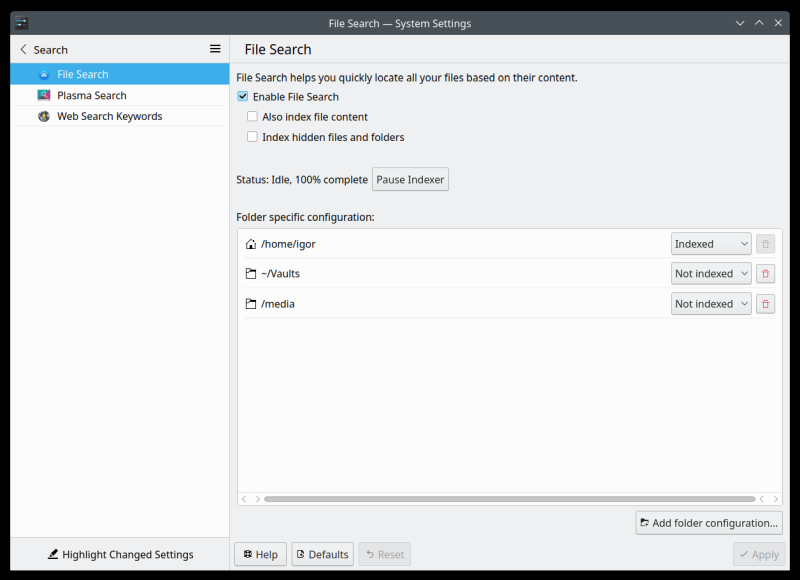
If you open Krunner, you can configure File search settings. Namely, you can enable file search, index file content, and whatnot. You can also add folder exclusions, as I did below. However, there's no option to add individual files or file types. Say, you want to exclude all MP4 videos, there's no GUI option to do this.
Configuration file
To make additional changes, you need to open the Baloo configuration file. To add confusion, until recently, Baloo config was located under ~/.config/baloorc. However, more recently, it's called ~/.config/baloofilerc. So you need the latter, and inside this file, you will see the following content:
[Basic Settings]
Indexing-Enabled=true
[General]
dbVersion=2
exclude filters=litmain.sh,.obj,*.rcore,*.orig,*.o,*.m4,*.rej,CMakeTmp,ui_*.h,
.svn,.bzr,*.omf,*.swap,autom4te,CVS,moc_*.cpp,config.status,*.elc,
cmake_install.cmake,*.tmp,.histfile.*,.pch,conftest,*~,confstat,*.vm*,
Makefile.am,*.pyc,CMakeCache.txt,*.moc,CTestTestfile.cmake,*.csproj,*.pc,
.uic,*.gmo,*.aux,.xsession-errors*,*.lo,*.loT,confdefs.h,__pycache__,.hg,
.moc,lzo,*.po,libtool,*.la,_darcs,.git,CMakeTmpQmake,core-dumps,qrc_*.cpp,
*.class,po,lost+found,*.nvram,CMakeFiles,*.part,*.gcode,.ninja_deps,
.ninja_log,build.ninja,*.swp,*.map,*.so,*.a,*.db,*.qrc,*.ini,*.init,*.img,
*.vdi,*.vbox*,vbox.log,*.qcow2,*.vmdk,*.vhd,*.vhdx,*.sql,*.sql.gz,*.ytdl,
*.pyo,*.qmlc,*.jsc,*.fastq,*.fq,*.gb,*.fasta,*.fna,*.gbff,*.faa,.npm,.yarn,
.yarn-cache,node_modules,node_packages,nbproject
exclude filters version=2
exclude folders[$e]=$HOME/Vaults/,/media/
first run=true
folders[$e]=$HOME/
There is a directive called exclude filters=, and it already contains a lot of different file extensions, which Plasma will not index. Not bad. You can also see my two excluded folders in the list. Now, let's add to this list, say AVI and MP4 files (basically videos). Simply append, with commas, the relevant extensions to the end of the very long exclude filters= line:
...node_packages,nbproject,*.avi,*.mp4
Once you have this done, you can rebuild the search index. This can be done using the balooctl command-line tool. Again, not something for ordinary folks.
Doesn't work ...
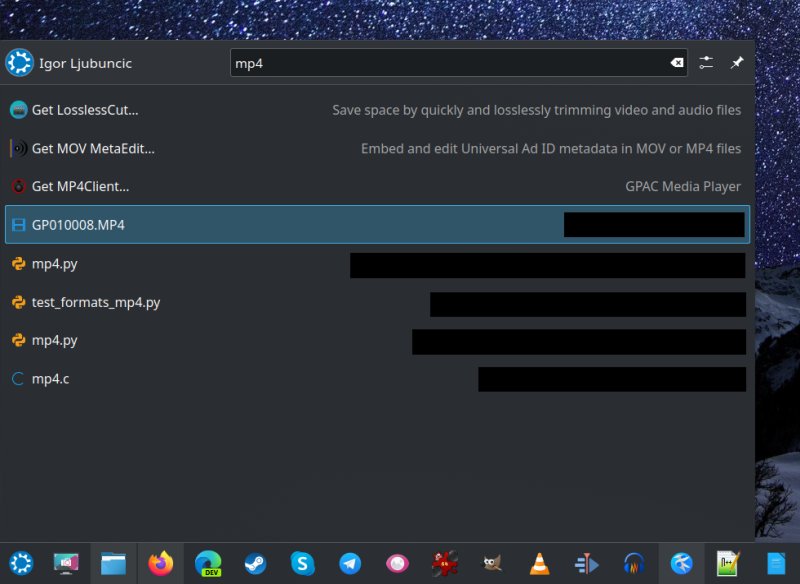
But the important thing is, I did this, and Plasma STILL showed a bunch of movie files in the search results:
Why does it not work?
The answer is silly. The filters are CASE-SENSITIVE. This does not seem to be documented anywhere in a nice fashion. Technically, if you have a bunch of media files, or any files for that matter, with lowercase and uppercase extensions, Baloo will treat them as separate types. Thus, .avi and .AVI are not the same.
This is quite silly, because the concept of extensions is arbitrary to begin with in Linux, so if it's used as an educated guess to identify files, or file types (like mime type), there's no reason to go overboard with a pedantic case-sensitive exclusivity.
The solution is to add all of the different variations to the extension list. But that also means if you have other files, including those that match the default exclusion list, which might use a slightly different mix of lowercase and uppercase characters, Baloo will not exclude them correctly. Or rather it will, sticking to a strict model that makes absolutely no sense in everyday usage by normal people.
...node_packages,nbproject,*.avi,*.mp4,*.AVI,*.MP4
Now, after rebuilding the Baloo search index once more, the results are okay.
Conclusion
Baloo remains messy. If you look at the list, it's not even nicely ordered. You have, for instance, a bunch of CMake stuff in three separate places in the comma-delimited list, a bunch of potentially useful files are excluded (say virtual machines, shared libraries or ini files), and the whole thing feels clunky. There's also no easy (GUI) way to add clean exclusions for entire families of file types (e.g.: movies or images), or individual files or extensions (not case-sensitive).
If you want to combine the Activities, Vaults and somewhat "restricted" search across your desktop usage, then you need to carefully check that Baloo isn't going to ruin your setup with its weird default settings. You might have to resort to a combo of Settings and command-line hackery, I'm afraid. But hopefully, now it all makes sense, and you will have somewhat consistent results from your Plasma search. Until next time, fellow Tuxers.
Cheers.