Updated: April 17, 2023
Welcome to a fresh article on VLC problems in the Plasma desktop environment. Sounds like a deja vu. Well, because it is. A while back, I wrote an article about intermittent playback errors from Samba shares when using the Plasma desktop and its Dolphin file manager. The workaround to the problem was to increase the prefetch value in VLC's settings, and Bob's your uncle. Now those playback woes are back, but in a slightly different manner.
I encountered the issue on my Slimbook Titan, which runs a fully up-to-date Kubuntu 22.04. The problems manifest thusly. You try to play a file, the progress bar shows yellow left-right progress bar animation, then resets itself. The file never plays. You try again, and sometimes, after a second or a fifth attempt, it works. Then, on top of that, when playing .avi files, there are TWO VLC windows. You only see the second one when you try to close the player, and then under the normal interface, there's this weird old-school X window. Let's fix these.
Problem in more detail
The following happens when trying to play files off Samba shares only:
- VLC starts quickly, instantly, but the playback takes 2-3 seconds.
- Sometimes, there's no playback - yellow bar animation, the clip length resets itself to 0, nothing.
- Repeated attempts to play the exact same file lead to success.
- There's no rule which file may or may not play on the first go.
- With .avi files, a second window is spawned underneath the main interface. It is not alt-tabbable, cannot be interacted with, is not shown in the task manager, and you only see it when you close the file. There's an exit delay of about two seconds for VLC, the main window disappears, then this second layer is shown for about a second, and then it disappears, too. The second window has no buttons or even a border. It looks like a detached media player frame.
Solution
Absurdly, the fix here is the opposite of my first tutorial. I noticed that VLC now ships with the prefetch value set to the high number - at least in Kubuntu 22.04 that is - and identical to how I had it configured in my original guide. I reduced the value from 16 MB to 16 KB, and now everything works great again.
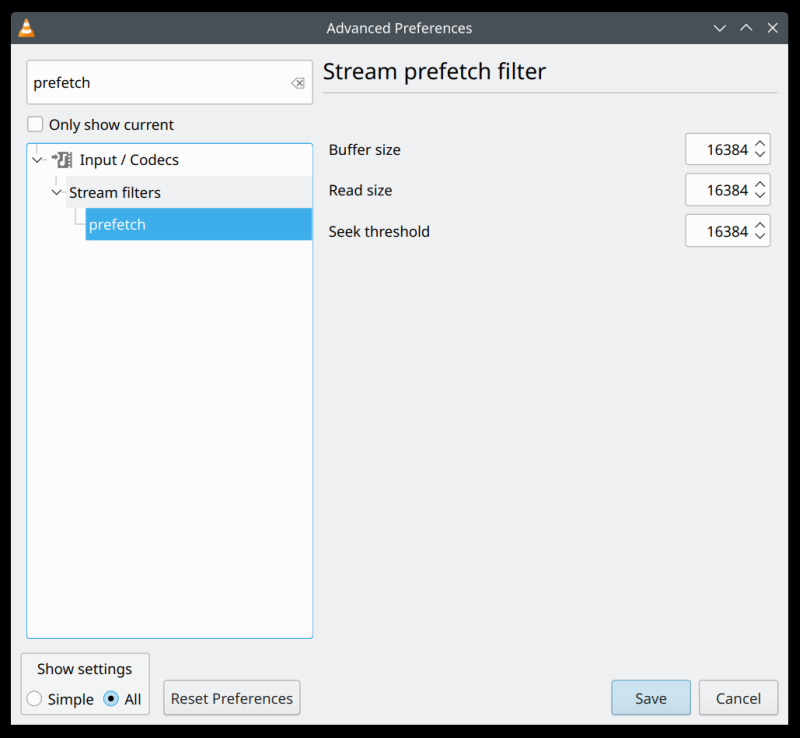
The end result is: instant VLC launch and playback, no more "buffering" errors, no more delays, and no second playback window. The only hypothesis I have is that with whatever changes were introduced into Samba lately, the protocol handler is more sensitive to delays, and this can lead to resets. I can't explain the second window in any way, though.
Furthermore, my Samba connection speed and latency are good:
- I get about 20 MB/s steady with the Slimbook Titan + Kubuntu over Wireless.
- There are no resets or errors whatsoever with non-Plasma desktop environments.
- I always test under the same conditions - same equipment, same physical placement.
- Even with an identical laptop (e.g.: IdeaPad 3), different distros give completely different results. The Samba throughput, even for identical files, goes from 7-17 MB/s, under identical conditions. So it's obvious that there's a quite something finicky in the Linux implementation, and then across different desktops, and across different distributions with the same desktop environment. The casual fragmentation and randomness kill me. This is not how it should be.
Conclusion
Rant over, technical details provided, problem solved. I absolutely hate these papercut-style issues, because they should never happen. I also hate the fact that something as trivial as media playback from a network share cannot be taken for granted, 100% of the time. Why do I need to worry about these odd things, and why does the behavior need to change every now and then?
I do not know for how long my anti-tweak will work and last. Hopefully, I won't have to revisit this exercise in the future, but apparently, you never know. Well, if you're one of those people who experience this odd behavior with VLC, try the prefetch filter read size value. Until next time, fellas.
Cheers.