Updated: October 6, 2018
The Windows Update functionality has changed a lot over the years. I remember you needed the Internet Explorer and ActiveX to download stuff in XP. Then, come Windows 7 and 8.1, we got a dedicated browser-less utility that would - will - do this for you, relatively quickly and elegantly. Windows 10 introduced yet another change - the updates are nestled inside the immersive control panel (the new settings), and you get them in a cumulative fashion, and with less tweaking than before. Oh, they also got much, much longer. And also far less stable than they used to be.
In this article, I want to talk about these changes - and what they are harmful to the user. And then, talk about what Microsoft plans to do to address user complaints (partially). And then, there's the overarching story, and this is one of the regressive nature of agile development that has taken the Internet by storm, and not in a good way. Follow me.
What have the Romans ever done for us?
As an advanced user, I value the following characteristics in software: quality, stability, predictability, speed. Applications, tools and services need to do their job in minimum time, with minimum disruption to my work flow, and do so reliably.
Windows 7
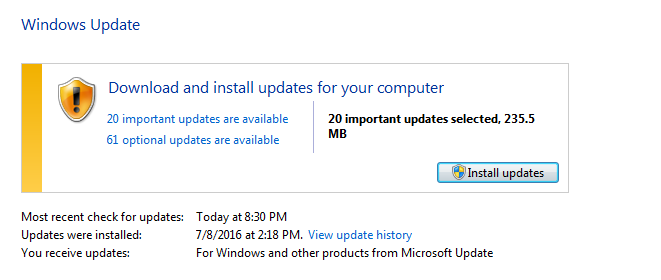
If I judge the Windows Update mechanism against these pillars, then in Windows 7, for instance, we get:
- The updates are robust and work well. No complaints.
- The stability is also really decent. No complaints.
- Predictability - this has changed some over the years. First, there was the aggressive GWX campaign, which saw the WU become a delivery (advertisement) platform for a new operating system. Users really had to invest time and energy in deferring the pesky offer. I've written a lot about this, and I'm not going to talk about it too much. That's not the point. Then, ordinary updates became cumulative, with security and quality rollups offered instead of individual KBs. This removed a level of control from Windows users.
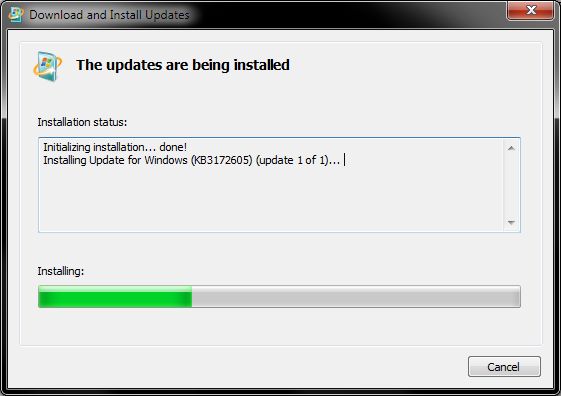
- Speed is another hot one. For a while, everything was fine, but then, over time, Windows 7 (and 8.1) updates became slow. It would take hours before you'd see results. This was eventually resolved through a series of updates. In a way, this did hurt quality, but more in the way users experienced the updates and not in a way that hurt your actual software setup.
Windows 10
Now, let's take a look at how Windows 10 does this:
- The updates are relatively robust - even if things sometimes go wrong, the self-healing and recovery mechanism is really good, and I have yet to encounter a state where the system is not bootable. Yes, I've read all the news and reports, but I can only talk from my own personal experience.
- The stability roughly falls into the same category. Except ... recently, there have been more and more cases of bad updates that cause damage and disruption, like the 1809 update deleting user files. I haven't yet tested this myself, so I can't confirm this, especially since I never use the built-in folders to store any files, but this is an indication of an alarming phenomenon. I have always been a great fan of Microsoft's QA and stability, and they seemed to do meticulous work in creating high-quality products. Not so much anymore, it seems.
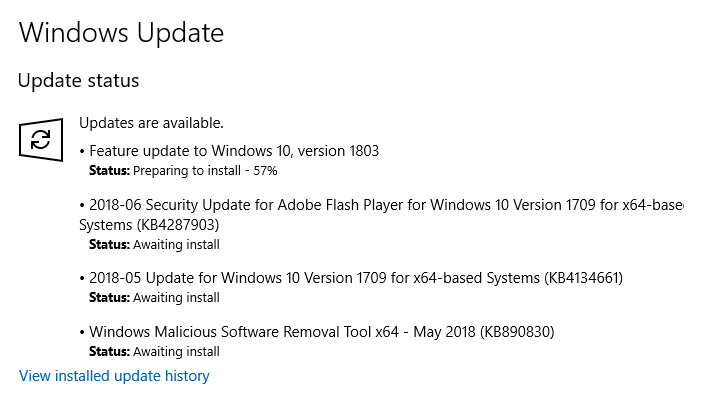
- The predictability is quite bad. You get cumulative updates, but more than that, you almost have no flexibility, not when the updates will run, when they will install or when the system reboots. This is a big change compared to the previous editions of Windows. Home edition users have no say. There are many ways you can mitigate this, like disabling the update service until you need it, and hiding updates through a special tool, but that's a separate topic.
- But the biggest issue is speed. Windows 10 updates are slow compared to previous Windows version. Typically, regardless of the cadence of updates (one or three months or whatever), Windows 7/8.1 would take about twenty minutes to complete. Usually, it's about 200 MB worth of data, and you have a single reboot upon which the update setup finishes, and you can move on with your life. With Windows 10, every part of this cycle takes longer: the downloads are slower and have an impact on your network throughput in a noticeable way; the installation is slower, especially with biannual updates (Like 1804 for instance); you experience more than one reboot, and the time in-between is also longer than before. You can easily lose a couple of hours waiting for the process to finish.
Welcome to Agileland
I blame the new rapid-and-break-things philosophy on pretty much every single software ailment in the past five or six years. Uniformly across the industry, companies are doing fast software releases, which do nothing to improve user experience or quality. Dev practices intrude into the user space. You keep getting less and less. Quality and stability suffer. This creates an illusion of productivity, but it is nothing more than a pointless exercise in generating noise.
Microsoft does not escape this trap, and this manifests in the end product. First, the new Settings menu, the portal that takes you to the updates page, is less usable than the old Control Panel. The old desktop tool had a simple, concise and mouse-designed interface, and you could quickly access everything. You had a lot of useful information in any single screen and lots of customization. The new facility is touch-designed, which means it does not work well on the desktop. It works superbly on the phone - I'm a proud Lumia 950 user - but it's a terrible solution for the classic PC formula. On the classical desktop form factor, touch software is always, ALWAYS inferior to desktop products. There's not a single touch application in the whole universe that works better on a desktop than its keyboard-and-mouse equivalent.
The Settings menu has a deep hierarchy, with tons of sub-menus - more mouse clicks, less visibility. Then, you get to the Windows Updates. For home users, no ability to actually not download the updates. No ability to deselect or defer updates. Slower process throughout.
Don't believe me - take a look at what Microsoft itself has to say.
Microsoft acknowledge that its Active Hours and sudden reboots methodology is not working well, and it's now working on a cloud model that should minimize (but not eliminate) such disruptions. They have already started trimming down on updates times (or at least trying to). All of that sounds pretty good.
Except ...
This is all an exercise that started with a solution to a problem that did not exist - but created problems of its own that are now being solved more like the original state that had no problems to begin with.
- Slow updates? The old mechanism worked fine, just go back.
- Reboots are inconvenient? Go back to the old model, problem solved.
- Cloud model? Why? The old mechanism works fine.
Very simple, you see! Brilliant!
None of these new updates mechanism changes would be necessary in the first place if the Windows Updates functionality had not been altered, and if it behaved like in the past. That's it. Simple solution. Moreover, in general, there's not a single valid reason to force updates on users - and then there's not a single valid reason to work on any software logic that should time these reboots. Hint: Reboots are NEVER okay. Ever.
Systems should remain up and running for weeks and months, without any disruption. If everything gets installed in one go, there's no reason for multiple reboots. Time figures can be cut down to the old values by simply not changing a well-proven mechanism.
And so, all these unneeded changes will, probably, one day, coalesce into a product that has more or less the same characteristics that we already had five or seven years ago. It will have been a journey that starts and ends at the exact same spot with a lot of energy invested (or wasted).
We've already seen it happen. The Windows 8 Start Screen. It came, it went, and we're back to having an ordinary start menu, because you cannot beat superior ergonomics. The same logic applies here. Some things are just right, and any change disrupts the fine, elegant balance at the heart of it.
Conclusion
I am not happy with the direction the "modern" software world is going. It's one giant waste of money. Companies are focusing on the effect of looking busy rather than creating high-quality products in one elegant go. And whenever products are normalized toward the "average" users, AKA the lowest common denominator, AKA the sub-IQ100 crowd, the products become a horrible, inefficient mess. They might make more money for the companies, but ultimately, they destroy the very essence of what the product was about in the first place.
Windows Updates were just fine before Windows 10. Quick, simple and configurable. Power users had their choice, and ordinary people never cared. Now, power users are being punished by dreadful inefficiency for the sake of some model that ordinary people, in the best case, will not notice and appreciate, and in the worst case, make them complain, because even ordinary people will get angry if they get a sudden reboot when they don't expect it. Really, it's like Shakespeare's Much Ado About Nothing.
So it was all fine, and then Windows 10 took it back a couple of steps, and now Microsoft is trying to improve on what is broken when it never needed fixing. In a way, we can hope, in this case, that the step forward will actually be a step back. Back to how the updates were (are) in Windows 7.
Cheers.