Updated: October 24, 2025
Ah, Windows 11. The gift that keeps on punishing the user. All right, I'll try to keep my rants to a minimum. Don't use this operating system, it's pointless. Also, I showed you an in-depth guide on how to minimize the modern, low-IQ noise that comes with it, so that you can enjoy a modicum of normal productivity without being profiled or cloudified or whatever you call this pseudo-touch Web 2/3/4 nonsense or such.
Speaking of cloud, I also wrote a guide on the minimal set of services for your Windows 11. But even with all these fine tweaks in place, there are always, always fresh stupid surprises, new things that show how bad and silly Windows 11 is. Case in point, I have Edge disabled, via IFEO, but here and there, various Settings links will still try to open this program (and fail of course, hihi). So, I wanted to see what gives, Edge wise, in the Start menu, and lo and behold, it tried to offer me various Web search, even though I also have this aspect disabled via registry. So, we need yet more taming and pruning. Let me show you.
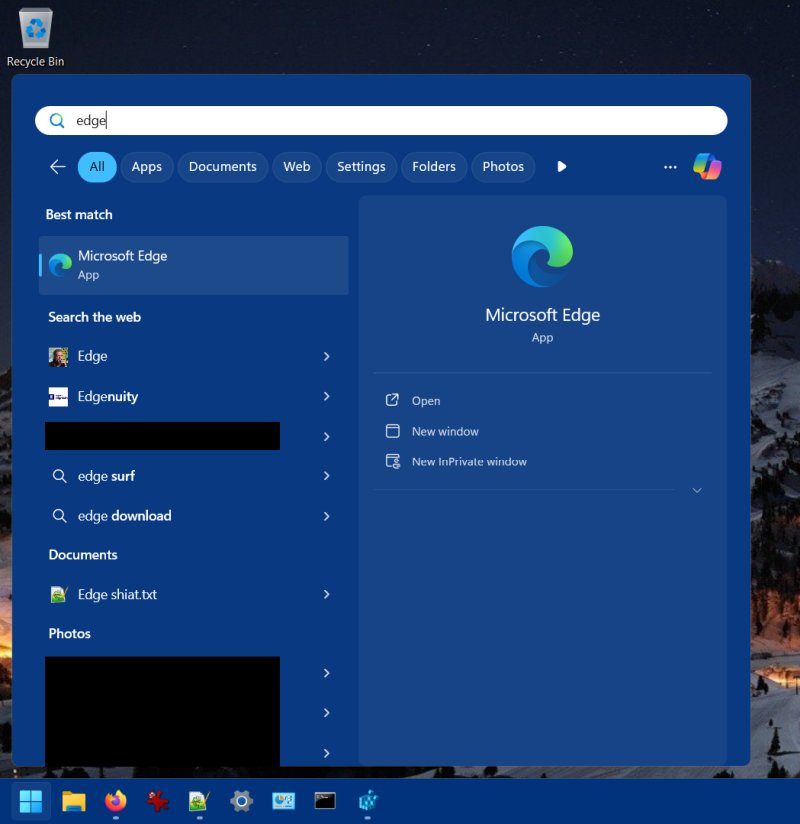
"Search the Web"
Just to be triple-clear, I have disabled Bing search, cloud search, all that crap (see my guide). I have also disabled the cloud consumer turdlings, and all Store-related services do not run on my machine. And yet, despite all those settings in place, Windows 11 still tries to turn my desktop into a glorified Web portal. While I expect only local search, as a dozen different settings on my machine indicate, Windows 11 ignores all these fine settings and tries to "hijack" the Web search, so that they may capture some of that sweet, sweet data.
So, it showed Edge, but it also gave me five different Web search suggestions, none of which make any sense of course. But I guess, if you click those, they will open in your browser of choice (or will they), and shown in your search engine of choice (or will they). Perhaps this will launch the mega-winning combo of Edge and Bing for the glory of Microsoft.
I don't know, and I don't care.
My Start menu should only show local content, as all my privacy settings and all my registry keys clearly emphasize. The fact Microsoft/Windows 11 want to show me online stupidity is a clear disregard of my choices and my intelligence. Don't want. GTFO.
Disable Search Box suggestions
The workaround is to add yet another registry key. You will need to run Regedit as administrator, as your ordinary user will not be able to write to the desired locations. Basically, we will need to create a key (if it does not exist), and add a 32-bit boolean value.
Open regedit, and navigate to the following path:
HKEY_CURRENT_USER\Software\Policies\Microsoft\Windows\
See if the key named Explorer exists under this path, in the left pane. If not, right-click on the entry labeled Windows, and add a new key called Explorer. Then, click to enter this path.
In the right pane, right-click, create a new DWORD (32-bit). Name it DisableSearchBoxSuggestions.
Once created, double-click on it, and change its value from 0 to 1.
Close regedit, and restart your computer.
After the change...
Now, the search box won't be showing online crap anymore. But there's a twist. For me, Windows now complains that my search indexing does not work. This is totally bogus. When I you check my search settings, I can clearly see that everything works correctly. The service is running, the indexing is running, and the search actually returns what it's supposed to do (plus extras, but now only local). The message stays there, to remind me I'm a naughty boy (like Brian in Life of Brian). Your experience may vary, but that's the beauty of "modern" software. The rollercoaster of fun and not fun.
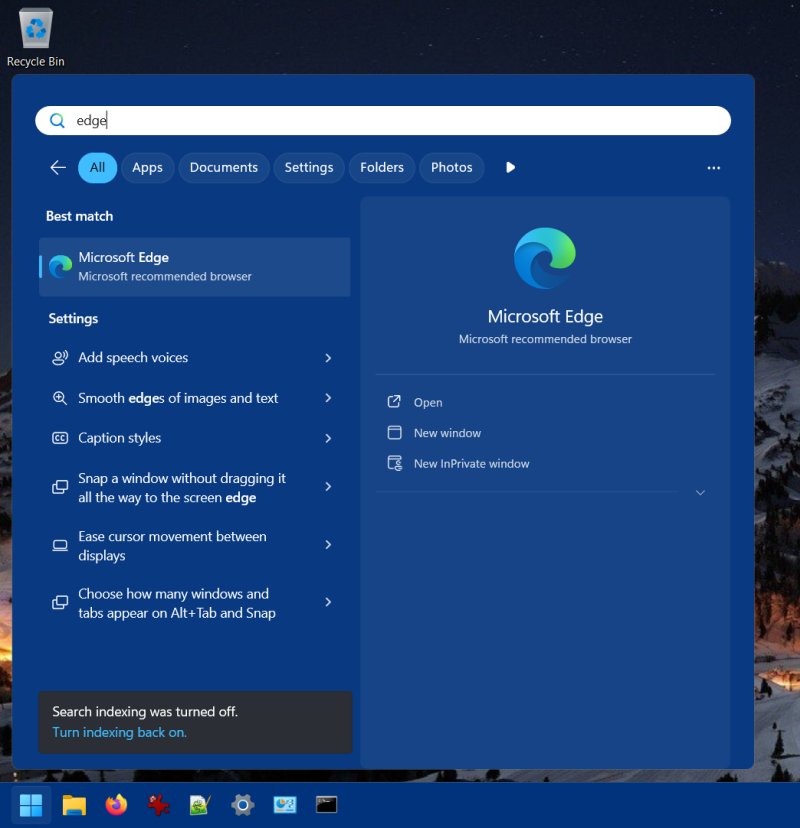
Just look at those search results under Settings. What.
To repeat, below, this is utterly false, because my search works and the indexing is configured correctly.
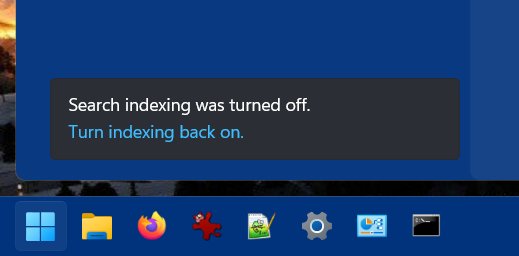
Just ignore that, or install a superior alternative, the Open-Shell menu, which won't annoy you.
Conclusion
Since I'm not using Windows 11 for anything but testing, writing these articles and some masochism, I don't greatly benefit from these changes day to day. Even so, I derive massive, massive joy disabling these modern stupidities one by one. There's an almost spiritual level of fulfillment tweaking Windows 11 into the good ole Neanderthal mode, and I don't mean that in a disparaging way, at all. The desktop is supposed to be a boring thing. It's supposed to be a local thing. But the onslaught on intelligence and human decency continues unabated. The tech industry won't stop until we reach the Idiocracy singularity.
If your cranium contains more than three cells, and you can count to more than 100 without getting confused, you owe it to yourself, to humanity, to the entire universe, the multiverse, and simulations not yet created to resist the stupidification of your computing experience. Sure, the computer does not need to be the exclusive domain of basement-dwelling neckbeards. But it must not be a crayon factory, either. Well, there you go. Have fun tweaking, and remember your existential duty. More Windows 11 articles coming soon. Hue hue.
Cheers.