Updated: February 11, 2026
It was a little bit hard for me to choose the title for this article. It's a bit wordy and descriptive, and it covers a rather curious problem. To wit, you have a Linux system, most likely one based on Ubuntu. The networking works in it. You can ping, browse, use apt on the command line. But if you say launch Discover, which would be KDE's software management frontend, it will complain that it's offline. Indeed, NetworkManager shows no networks, even though you're online. Weird, innit, guv.
I encountered this problem when I created my own system from "scratch", starting with Ubuntu Server, and having added the Plasma desktop environment on top of it. I did this in an ARM-based virtual machine running in VirtualBox on my Macbook, as this seems to be the best way to have your own Ubuntu-based KDE-based ARM architecture Linux distro set up. But obviously, the network was "borked". I resolved this, and I want to show you what I did to get there. After me.
Networking over-complication
So, the situation is as follows:
- On the command line, you can run ping or apt, or open a browser, and use it normally.
- If you wan to check whether your network adapter (wired) is connected, you can run something like ifconfig in a terminal window. And I do mean ifconfig and none of the "modern" tools. Install the net-tools package, and enjoy the SUPERIOR ifconfig and netstat to any would-be replacements. Say no to less efficient administration.
- Ifconfig shows you are connected. In my case, enp0s8 (usual eth0 card) had the IP address of 10.0.2.15, which is what VirtualBox assigns by default to NAT-connected adapters for guest operating systems.
- Now, if you open Discover and run it, it says:

Why this odd error, you ask?
Discover uses PackageKit to manage updates. PackageKit relies on NetworkManager to tell you whether the system is online. If NetworkManager cannot see any networks, it assumes it's offline. And then, PackageKit assumes it's offline. And then, Discover assumes it's offline. We have three systems that ASSUME things, while not a single one actually checks whether the network works at all. This is a rather interesting phenomenon that highlights a lot of the conceptual and implementation problems in the Linux desktop.
But it gets worse. Much worse.
Why would NetworkManager not see any networks? After all, the networking works! And in the desktop edition of Ubuntu or such, usually, there are no issues. but.
Complexity for the sake of it
Well, as it turns out, Ubuntu has implemented a lot of changes over the years. To me, many of these make little sense. This is also true of other distributions, but the focus here is on Ubuntu. New tools and methods are added, but they are usually: 1) not backward compatible 2) badly documented 3) awfully implemented 4) not necessary other than being newer than whatever they are replacing.
- When it comes to Debian and Ubuntu, the "classic" way is to keep the network configuration in /etc/network/interfaces. To be fair, this is cumbersome, and I always preferred the Red Hat or SUSE way. When I worked with SLES in the enterprise (a lot), network management was rather simple, with per-interface configuration files. Simple plain text files. But for some reason, for modern generations of developers, system administrators and DevOps people, text seems to be an anathema. They would rather YAML or JSON things, for some reason.
- Thus, Ubuntu now uses something called netplan. This thing is not intended for desktops. How do I know? Because its default configuration is called 50-cloud.yaml. That tells you everything. Really, that's it.
- The new tool keeps per-interface configurations under /etc/netplan, in YAML format. On startup, these files are parsed, and you can read them via /run/netplan. Of course, the original recipes and the parsed text are not identical. This adds opaqueness and complexity. System administration is meant to be simple. This is far from it.
- Netplan is not really meant to be used GUI way. It's a CLI tool, intended for networking automation in cloud setups, data centers, all that. Thus, when you use a desktop environment like say Plasma, the network management job become the responsibility of a tool called NetworkManager. So we now have a third component in the play. And a clash.
- To make things work "correctly", Ubuntu needs to tell netplan to defer its authority to NetworkManager. This means yet another YAML configuration. Without it, NetworkManager will sit idly, do nothing, assume it's offline, and everything that relies on it will think the same. A chain of ignorance.
- Oh, there's systemd network component in the loop, which can also make your boot sequence slow. Specifically, there's a "wait" service, which will hang if there's meant to be network but it doesn't work. Horrendous. I have always despised systemd, but now, the loathing is almost elemental.
Resolution
I've already written most of this in my guide earlier, but for brevity, here are the details.
Disable systemd networking component
Remove the annoying bits that may make your startup hang if you add "not-working" networks:
systemctl disable systemd-networkd.service
The output:
Removed "/etc/systemd/system/multi-user.target.wants/systemd-networkd.service".
Removed "/etc/systemd/system/network-online.target.wants/systemd-networkd-wait-online.service".
Removed "/etc/systemd/system/sockets.target.wants/systemd-networkd.socket".
Disabling 'systemd-networkd.service', but its triggering units are still active:
systemd-networkd.socket
Create netplan deferral recipe
To make netplan cede its authority to NetworkManager, under /etc/netplan, create a file:
sudo nano /etc/netplan/01-network-manager-all.yaml
How did I know about this file? Simple. I looked at one of my laptops running Ubuntu desktop. And I simply copied the configuration over. Then, in this file, I added the following declaration:
network:
version: 2
renderer: NetworkManager
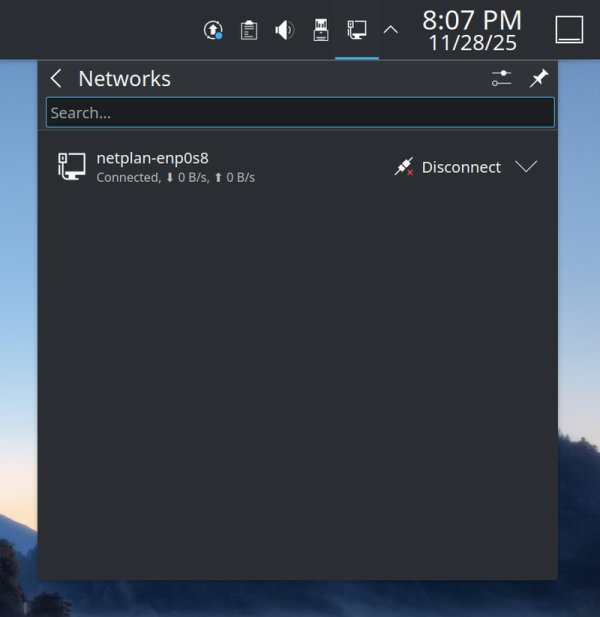
You could now simply restart NetworkManager, but it's easier to reboot. Once your system comes online, NetworkManager will now correctly show your interface. It will even bear the "netplan" name, as the recipe still comes from /etc/netplan, but it's the GUI tool now managing it.
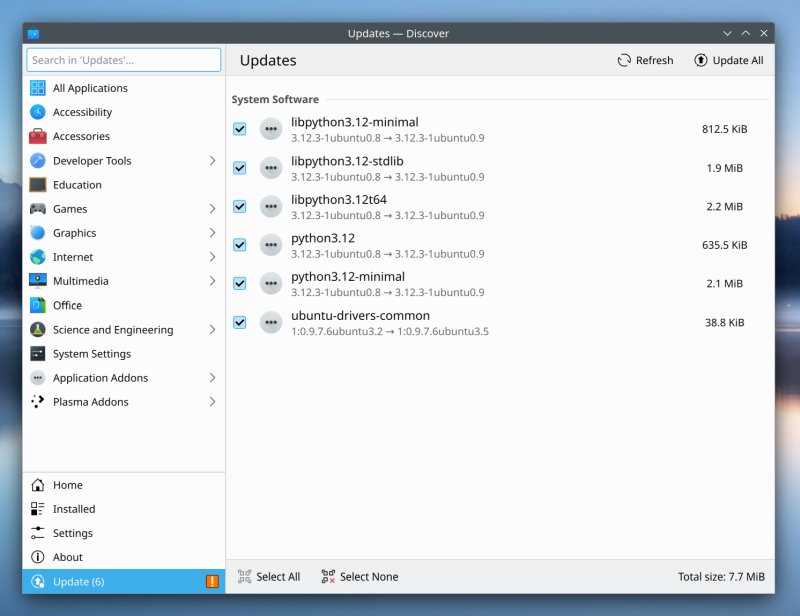
And as part of the cascade effect, both PackageKit and in turn Discover will work correctly.
Separate workaround
If you search around the Web for "NetworkManager offline but not offline" sort of thing, you may come across a trick whereby you create a new (functioning) network interface, which will not be your default interface, but it will still work and provide connectivity. You can do this manually, through NetworkManager settings, or use its command-line interface, for a one line:
nmcli con add type dummy con-name fake ifname fake0 ip4 1.2.3.4/24 gw4 1.2.3.1
The "problem" with this suggestion is that you will be adding a new "component" to your network stack. And if your default network does not work, you don't necessarily know how the traffic will flow, and what may happen once it's directed to this "fake" network. While quicker, the solution is not as vanilla as it could be. I am more content with changing the netplan behavior to match the desktop.
BTW, a side note on "security" ...
As you probably know, KDE has decided a while back to disable running certain programs with sudo as this is considered a "security vulnerability". You should run normally, and PolicyKit ought to jump and ask you for your password when needed. If you try, for instance, sudo kate, you will see this:
Running this editor with sudo can cause bugs and expose you to security vulnerabilities. Instead use this editor normally and you will be prompted for elevated privileges when saving documents if needed.
Now, this sounds cool - IF you can open files with kate. But netplan recipes have 600 permissions, meaning only root can read and write. So doing kate "yaml" won't result in anything. You can either change the permissions (which actually lowers security) or use an alternative text editor with sudo, like nano.
Ipso facto, this is a meaningless, pointless "security" measure. And worst of all, it is not a security measure in any way, shape or form. Because if someone has sudo, they should be able to sudo. The desktop shouldn't decide to be "smarter" than the system. Also, you can sudo rm -rf your entire box, but no, don't launch the file manager or text editor as sudo, because the user may accidentally whatever.
So, no, you cannot use the editor normally, and you won't be prompted for elevated privileges if needed, because you cannot open 600 files at all. This is an implementation problem, and there's absolutely zero security involved here. Security vulnerabilities? Like what? Nonsense.
Conclusion
I am rather saddened by the state of modern Linux. It's not just Ubuntu. It's the whole deal. Almost every distro, by proxy, has become over-complicated, as it mimics the unnecessarily vague and cumbersome cloud setups. The KISS principle of UNIX is fading away. Instead of truly simple and intuitive tools, you now have to combat multiple levels of abstraction, binary logs, endless re-parsing and re-formatting of data, and then some, all in the name of would-be innovation. The fact you can have three network management tools at the same time, tousling for dominance, is quite weird. The lack of unequivocal backward compatibility is the biggest issue of all. Finally, the cherry, it's cloud stuff. And it affects desktop stuff. Check your desktop box, and you will find all those cloud and enterprise utilities there. The desktop seems to be a lucky byproduct.
Enough ranting, though. If your goal was to fix a "glitch" in how a set of programs behaves because they wrongly assume there's no networking when there is, it's most likely netplan being all grumpy and cloudy, and NetworkManager sitting there, unaware of the powers that be. You can resolve the problem through some gentle YAML, telling netplan to relinquish its powers. And thus endeth another tutorial. And rant.
Cheers.