Updated: November 28, 2025
Welcome to my latest installment of weird. To wit, you use Linux, say Ubuntu or Fedora or whatnot. You use a virtualization product of some kind. In my case, VirtualBox, but the issue applies to a range of hypervisors. You start a virtual machine, and now and then, it stutters. Along the way, your entire system (the host) becomes unresponsive. I noticed this problem in VirtualBox 7.X onwards, in Kubuntu 22.04 onwards.
It took me a lot of troubleshooting, but I think I've finally figured out the root cause. As it happens, this is another pointless issue slash bug, stemming from a combination of things: kernel bugs, Spectre-family mitigations, host-hypervisor clashes, and then some. In other words, yet another issue that ought to prevent ordinary people from using the Linux desktop in a serious manner. But at least there are funny characters like me who try to make it work. So, if you please, take a look at this tutorial. After me.
Problem in more detail
Very simple. You start a virtual machine in your desired virtualization product. At some point, the virtual machine becomes unresponsive. It could be something as simple as clicking on a program icon. Then, you also notice that your own host desktop isn't behaving correctly. It no longer responds to mouse clicks, or certain programs don't respond while others do. Sometimes the "issue" resolves itself, and sometimes it does not, and you must hard-boot your machine. Extremely annoying.
I had faced this issue for several months now. It's another kernel problem, of course, probably of the similar, useless crop that made my Titan misbehave for a while, or the one that STILL affects my Executive. For those interested, I linked these the fourth and the sixth report, respectively. For both these laptops, there've been more articles, so check my Linux section, if you like (sixth and tenth reports, no less).
Why do I think it's a kernel problem? Well, because it started all of a sudden while I was still using Kubuntu 22.04 and VirtualBox 7.0. It continues with Kubuntu 24.04 and VirtualBox 7.1. You could say the culprit is VirtualBox, but that would not explain a slew of kernel bugs that I've uncovered.
Namely, my system log has this silly error:
kernel: unchecked MSR access error: WRMSR to 0xd10 (tried to write 0x00000000000
0ffff) at rIP: 0xffffffff910c6be4 (native_write_msr+0x4/0x40)
kernel: Call Trace:
kernel: <TASK>
kernel: ? show_stack_regs+0x23/0x40
kernel: ? ex_handler_msr+0x10a/0x180
...
And if you search for "unchecked MSR access error: WRMSR", you will discover hundreds of threads, relevant for openSUSE, Fedora, Rocky, Ubuntu, Proxmox, and then some. It's a kernel problem all right, and the issues date all the way back to 2019, most of them unresolved. Wunderbar.
Since you need to understand the code behind the scenes a bit, in a nutshell, it comes down to the following: due to various mitigations added to the kernel (for those side-channel attacks and such), there is, or can be, a conflict between your kernel scheduling and core management and any subsystem that does the similar thing, like say a hypervisor, especially if you use paravirtualization and nested paging. Long story short, the mitigations can be a bit aggressive, which can lead to system freezes or hangs.
Also, on a side note, all of these kernel mitigations are 100% relevant for enterprise, 0% relevant for home use. But the Linux desktop is a coincidence of the enterprise/corporate kernel world, so you, the end user, must suffer enterprise problems on your home machine.
Workarounds
There are three ways you can reduce the incidence of this issue.
Reduce the number of CPU cores assigned to the virtual machine
If you're using something like 8, try 1-2, maybe 4. This will help some, but it won't eliminate the issue.
Disable nested paging for affected virtual machines
This will lead to a significant performance hit, but at least your machines will run fine, and your system will not hang. As an example, in VirtualBox, go to System > Acceleration, and here, untick the box that say Enable Nested Paging.
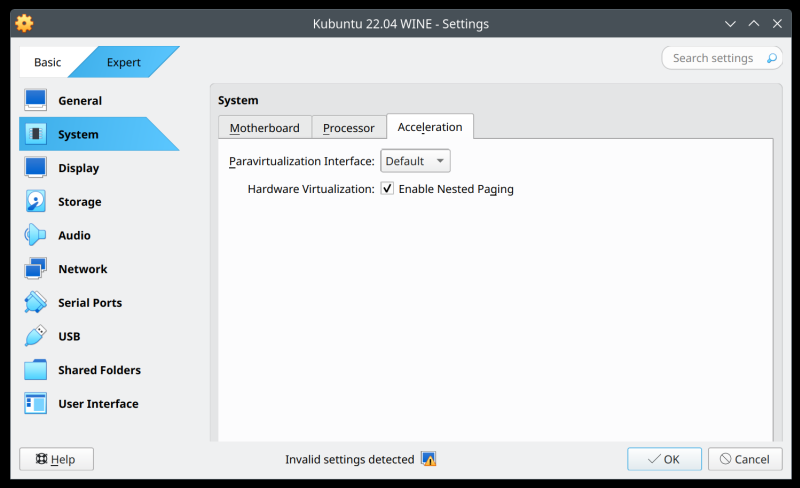
In general, there are several options you can try, see which permutations works best:
- Processor > Extended Features > Enable Nested VT-x/AMD-V.
- Paravirtualization Interface (the Linux default is KVM).
- Hardware Virtualization > Enable Nested Paging.
Disable paravirtualization (nested paging)
This can be done through BIOS/UEFI, which will disable this on the entire machine, or you can create a configuration file for the KVM hypervisor, which will prevent the use of nested paging for all virtual machines. Under /etc/modprobe.d, create a file titled either kvm-intel.conf or kvm-amd.conf, based on your processor architecture. Inside this file, add:
options kvm-[amd|intel] nested=0
After you reload the hypervisor kernel modules (or reboot), you will now have an MSR-free experience. However, I would not recommend you do this, because it will introduce a speed penalty for all your virtualization workloads. It is better, and quicker, to untick the nested pages option for each virtual machine as required, or enable/disable the option as required, until hopefully a proper kernel patch resolves this for good.
Conclusion
There you go. Another little problem that chips away my confidence in the Linux desktop. At this point, the accumulated punishment is becoming ridiculous. It's very nice that Linux is so modular and flexible, but why do I need to care about "rogue" guest tenants in the cloud on my bloody desktop? I don't care. And I would expect companies to test their kernels for all scenarios, not just the business world (if at all). We all know the Linux desktop QA is a joke, but if a kernel does something, there ought to be at least a modicum of testing.
I absolutely hate the issues of this nature. They go unchecked for YEARS. They are a shotgun blast type of problem that has no relevance for the home use. The issues represent a pointless regression. They make everyday use difficult. And they highlight how over-complicated the desktop space is, and how, in essence, it isn't a desktop space. At best, you're using a bastardized server with a GUI, and some small perks that ought to be called home use. In fact, in the coming weeks, I will actually demonstrate this by assembling my own little distro. Yup. Now, the roughness stems from the fact it's not a nice cozy product for ordinary people, as it should be. Anyway, if your system freezes while running virtualization, check your logs and try the workarounds listed above. Until the problem gets fixed, which could very well be never. Bye bye.
Cheers.