Updated: January 5, 2026
If there's one thing the Windows desktop does not need more of, it's the mobile-like features. And yes, every time, Windows 11 manages to surprise me with yet more stupid gimmicks, ported straight out of the touch-based smartphone world. Case in point, adaptive brightness on battery power. I was using my test instance, and I noticed the screen brightness changing. The display would dim or lighten up, depending on what I was doing, but I couldn't quite pinpoint it.
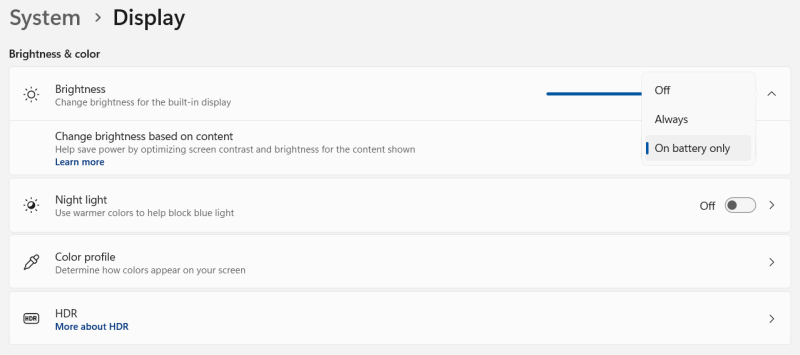
Then I realized, maybe the operating system is adjusting the brightness in a contextual manner, based on what's shown up. So I went back into the settings, and indeed. There it was. Stupidity. The system was configured to change brightness based on content (on battery power). What the ... Well, I changed this, and my screen assumed its expected brightness level, and stayed so ever since. I will shortly show you how to do the same, but also discuss this meaningless feature a bit more. After me.
Why this is so utterly pointless
First, it only happens if you use your device on battery - to "help save power". Ah. A guilt-based software tweak. Another little ritual to make the middle-class peasant feel overly important by "saving" things, even though you could save a lot more by having an operating system without telemetry or modern crap. But no, it's the microwatts you could lose or gain by having your screen gently strobe.
This is idiotic because it's a smartphone feature. Yes, you could be using your smartphone in all sorts of light conditions, and those conditions could change relatively rapidly, i.e. you move from the sun into a shade, you move from one room to another.
But a laptop?
How often does a person wander about working on a laptop? They don't. People sit somewhere, and do their work, whether it's inside or outside. For the most part, the lighting conditions stay put. Constant. Thus, whatever brightness level you set, it ought to satisfy your work requirements for at least several hours.
Instead, the turdling called Windows 11 may up or down your brightness multiple times in a minute, regardless of YOUR choices. This is another crap feature, another imposition of will by the tech companies onto the common ape, as though apparently, the companies know better.
No. This is an ergonomic failure. A massive failure. If someone works in a room with a given lighting, and they have manually configured their brightness as they need it, if you change this value, you're actually hurting their eyes. You induce strain. And if you do it multiple times, you induce even more strain.
Imagine you're working with photos, and you're editing them, and switching back and forth among several programs. Now, Windows 11 suddenly changes the display. It's not the same setup anymore. It's a smartphone stupidity, that's what it is.
How to disable adaptive brightness
Go into Settings > System > Display. Under Brightness & color, click the down arrow. Here, under the section titled "Change brightness based on content", choose Off. And your selected brightness level will be immediately restored, whether it's 50% of 100% or anything. Now, you can use your system without feeling insulted every other second.
Conclusion
It's very sad that big companies are destroying sane proven user interfaces just to placate idiots, and to squeeze extra profit from them. But in the process, they will ruin every logical, every scientifically proven fact about ergonomics, health, comfort, logic, and other things that require a three-digit IQ. Windows 11 pushes the bar further by doing a complete chimpanzee ritual with the adaptive brightness thing. If anything, it ought to be an opt-in thing, not this crappy, badly designed circus. But it shouldn't be a thing at all, because large, non-touch computers are not phones, shouldn't be phones, must not be phones. Take your swipey Dystopia and shove it.
Well, there you go. I would recommend you try other operating systems. Avoid Windows 11 as much as you can. It's steadily, progressively becoming worse and worse, with more inane options and features, reduced efficiency, more and more clicks, yet more profiling, more stupidity everywhere. The only way you can stop this total abomination is to stop using it altogether, or as much as reasonably possible. There's really nothing else. And with those sweet words, I bit thee farewell.
Cheers.