Updated: February 6, 2026
Fun sad fact. In 2007, when I wrote my review of 1942: Pacific Air War, I had better performance using DOSBox on a single-core Athlon running Windows XP than I have in 2025/2026 with multi-core new-gen modern processors and Linux as the operating system. Indeed, I've been recently re-playing this fabulous WW2 simulator, but the in-game playback smoothness, even the graphics, simply aren't as nice as they were 17 long years back.
This momentous setback prompted me to try to resolve the issue. Here we are. An article that should partially help you improve your DOS games speed. However, take into account I can't really guarantee success, as my own tests shows lots of unpredictability and weirdness. Still, it ought to be quite useful. And we will tie this guide to the tutorial on DOSBox sound issues I wrote recently, too. After me, folks.

Emulation speed
As you know, Ctrl + F11 and Ctrl + F12 lets you slow or speed up the emulation in DOSBox. Nothing new. You increment how many cycles you dedicate to your machine, and this could result in better playback, any which way. Sounds good, and it's a reasonable starting point. You can do one better by using the following CPU declarations in the dosbox.conf file:
core=dynamic
cputype=auto
cycles=max
These settings will help you get the most out of your processors, including scaling the frequency up and down as needed. For the most part, that should be enough to get you going, and enjoy reasonable performance.
Coincidental bonus: sound quality
What makes things even more interesting is that if you actually "max" out your processor's cycles, this may help with the sound emulation. I noticed that the sounds may stutter in a few games on low emulated CPU speed, but not when using the dynamic core and max cycles options. Worst case, it doesn't hurt to try, and see what gives.
Power management
However, oddly, I noticed the benefits aren't there uniformly. While some titles get an immediate boost from the CPU settings listed above, others do not, or not as much as they should. Case in point, the 1942 simulator was still "lagging" with relatively low FPS. Playable, but not as smooth as it could be.
Then, while playing on battery on a laptop, I noticed a sudden burst of speed. The simulator became responsive, with smooth, clean playback. I hadn't done any change, so this was quite surprising. Then, I noticed my laptop's battery was showing 15% charge left, and the system (Kubuntu) had transitioned into a power saving mode. Oddly, this actually meant better performance in the DOS emulator.
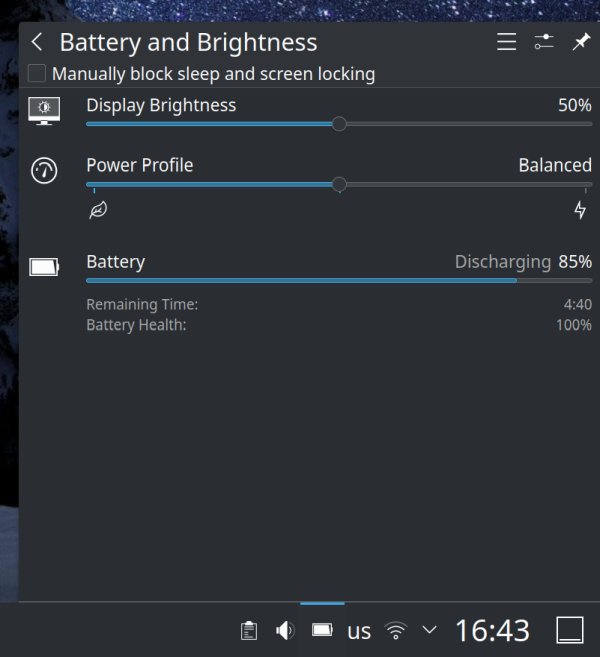
I am not 100% sure what happens behind the hood, and how the CPU's power state affects emulation. But from what I've been able to consistently observe, the energy saving power profile allows for better FPS in DOS games. Thus, you could try this "trick", too.
The functionality may not be available on all systems or for all processors, or available for quick change through the GUI (you might need the command line). If you're running something like Kubuntu 24.04, with the Plasma desktop environment, the system tray Battery and Brightness applet lets you make the necessary change with a simple toggle. Switch from Balanced to Power Saving, and you will most likely experience a smoother emulation. I tested this on Intel processors only, mind. For now.
Launch DOSBox, enjoy
Good speed, good sound, like in the good ole days.
Conclusion
I haven't really expected to be writing a fresh DOSBox tutorial let alone several new articles some 15-ish years after I resolved all of my DOS gaming problems. But that's life. New operating systems, new problems and conflicts and oddities. I've not gone into fine detail as to what happens under the hood, nor do I want to dabble in how DOSBox actually works (in Linux). I simply want to play cool, timeless classics.
Should you encounter speed problems in your old games, you may want to tweak the CPU speed, and this could also help with the sound. Furthermore, changing the system's power profile should also affect the processor frequency, and this may also benefit your games. How? I can't tell you exactly the fine intricacies of the mechanisms involved, but I can happily report some nice, tangible results. However, this is not the end of my DOS endeavors. Soon, we will have yet another sound-related guide and we will revisit the performance question once more, with a fresh, cool trick. Well, that would be all for now.
Cheers.